LordScannerSign inStart free
Kingdom S81Sample scan · 60% done

Every castle.
Every shield.
One chart.

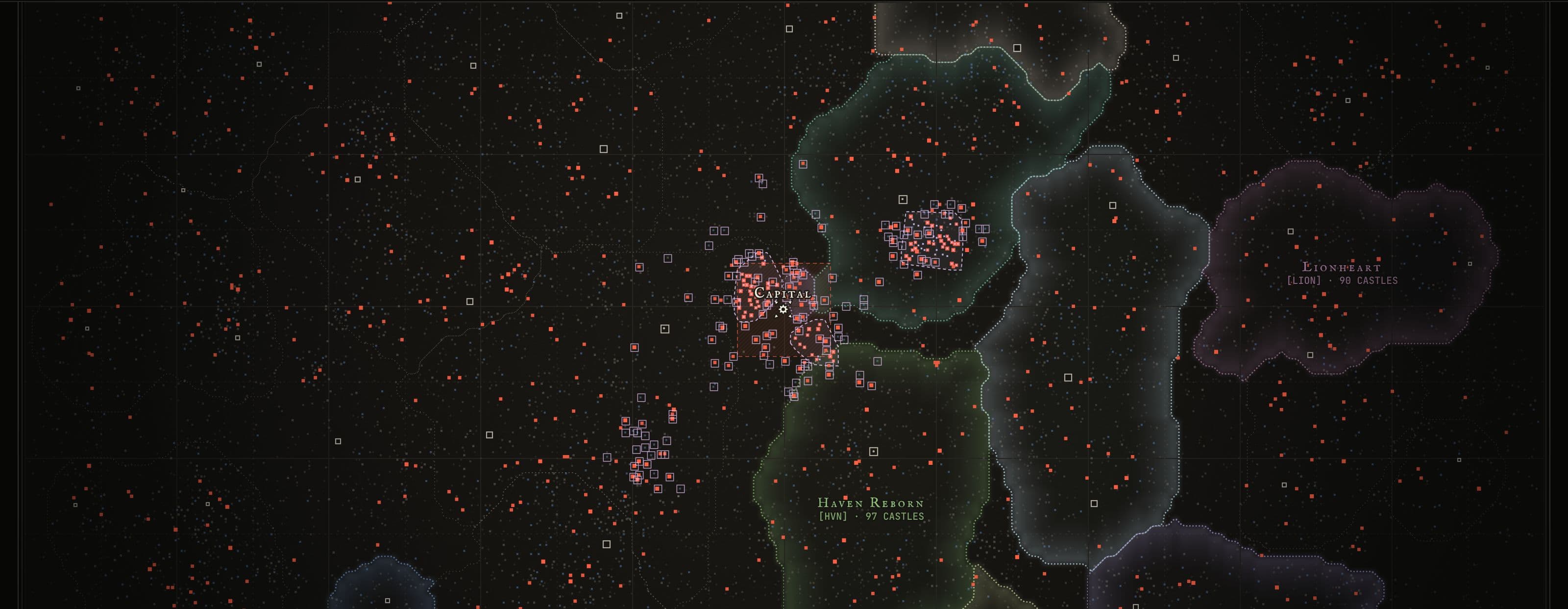
Engraved chart of a sample Top Lords kingdom: castles around the Capital marked by shield state, an invader from S78 and an unshielded Lv 24 castle called out. Synthetic data.Sample kingdom · synthetic data

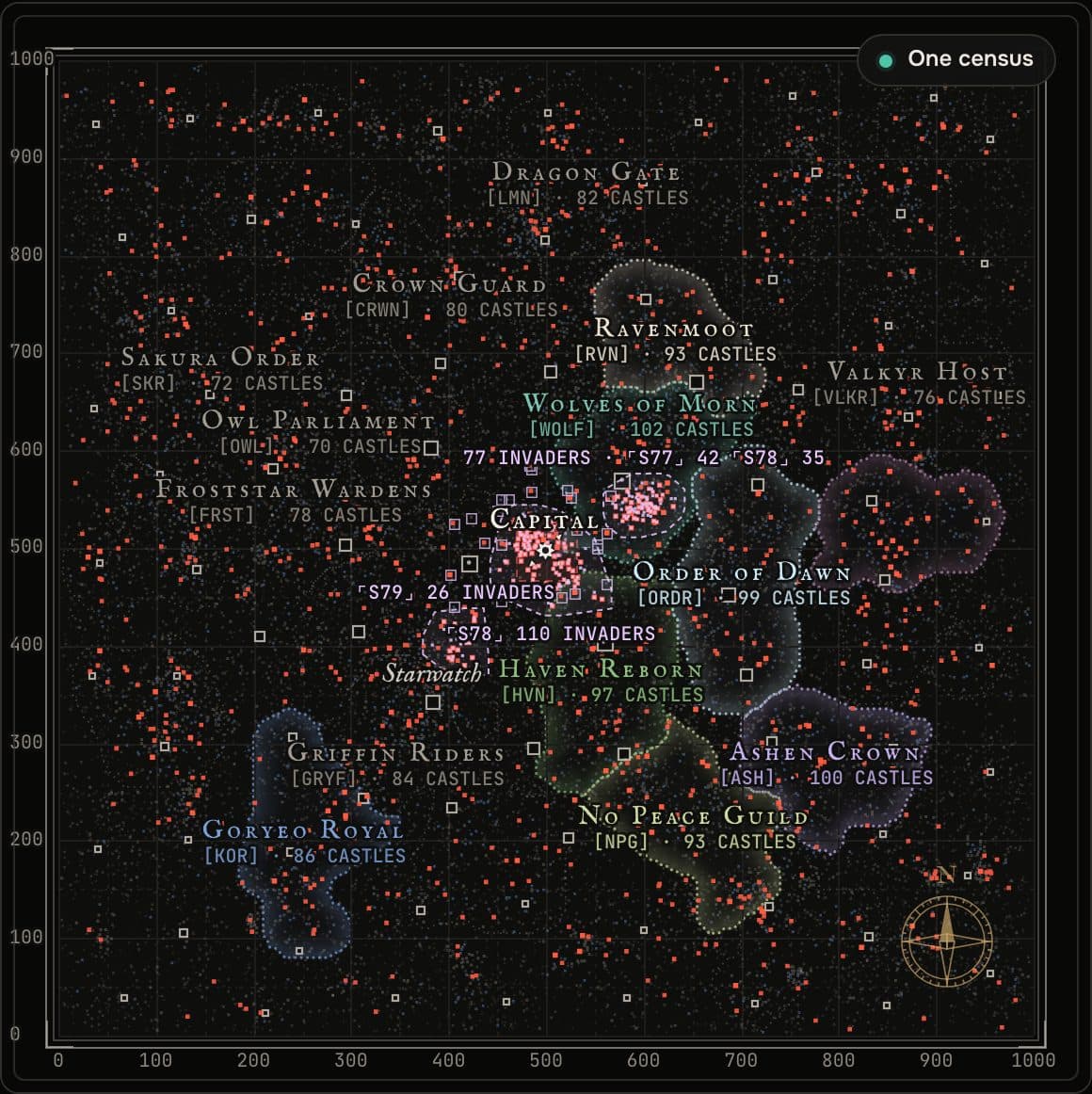
Scan Top Lords kingdoms in seconds. LordScanner puts every castle it finds on one chart: who is unshielded, who arrived from another kingdom, and where they sit, with coordinates you copy in one click.

Scan any Top Lords kingdom. Castle rows, coordinates and scans come with a plan.

AnyTop Lords kingdom you type in, scanned on demand
1scanputs the whole 1000 × 1000 kingdom map on one chart
1clickcopies X:… Y:… for the game's coordinate search
UTCon every time in the app, each with its age
Fan-built. Not affiliated with Top Lords or GAME SPARK. Coordinates for members only.

A search party, or the whole map

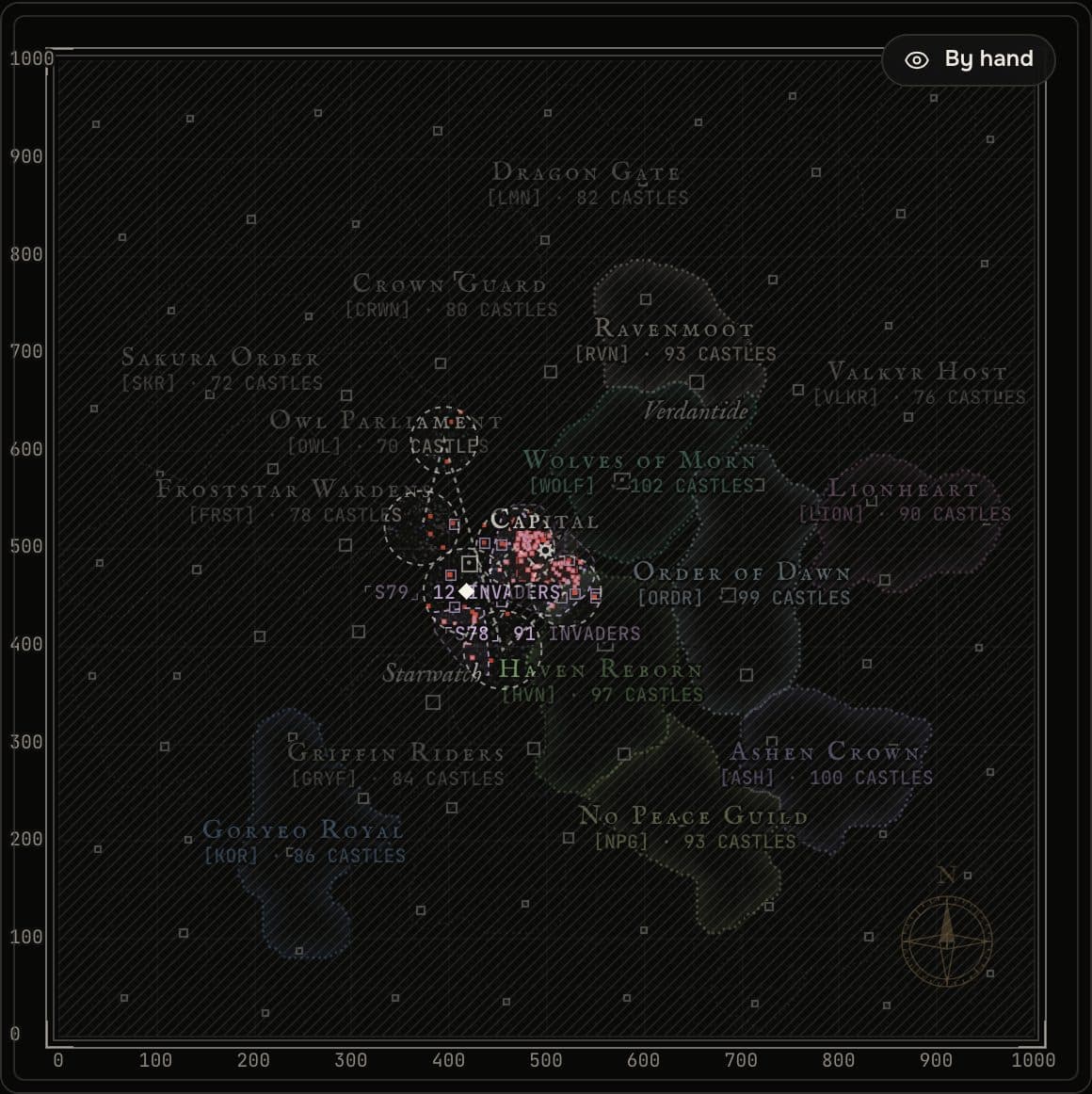
Scrolling the world map by hand shows the few screens around you. A scan covers the whole kingdom and puts every castle on one chart, each with the time it was read.

Sample kingdom scouted by hand: six screens around one castle are visible, the rest of the map is fogged.By hand
700castles in view after scouting 6 screens around one castle. Everything else is a guess.
The same sample kingdom after one scan: every castle on the chart, coloured by shield state.One scan
18,943castles after one scan, every shield state, every invader.Sample kingdom · synthetic data.

What the chart tells you

Two views of the same scan, on desktop and phone. The pictures show the sample kingdom in the real components.

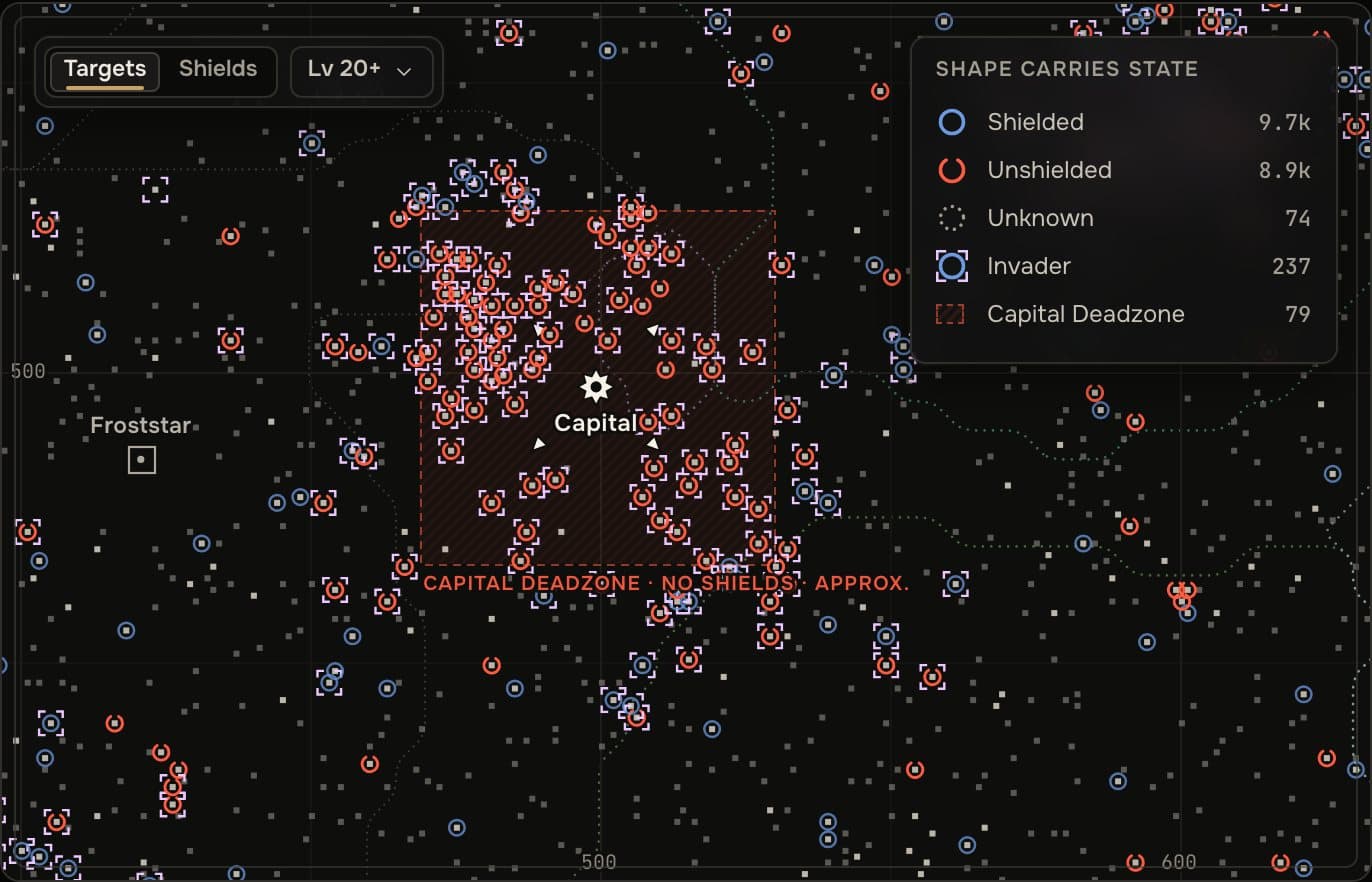
Kingdom map in Targets mode: shielded, unshielded and unknown castles, invaders in brackets and the hatched Capital Deadzone, with the legend.
Kingdom map

Who is open right now

The map opens on the whole kingdom in Targets mode. Castles at your level threshold carry their shield state; everything else stays quiet grey texture. Switch to Shields to see every castle's state.

  • Unshielded castles at your level and above stand out, larger and brighter than the rest.
  • Invaders wear brackets at every zoom, with the kingdom they came from.
  • The Capital Deadzone is hatched: no shields work there, so every castle inside is a target.
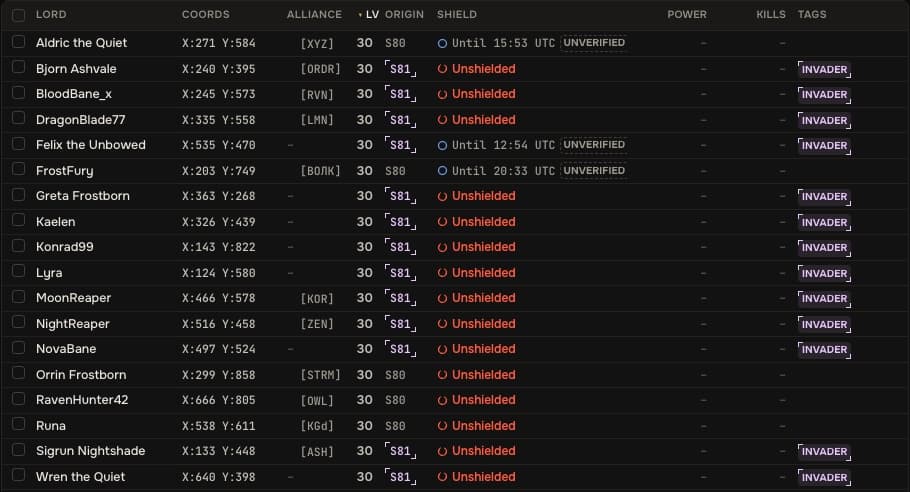
The Lords table: Lord names, coordinates, alliance tags, castle levels, origin kingdoms and shield state, with invaders tagged. Synthetic data.
Lords

Every castle, in one table

Search by Lord, alliance tag or X:Y, filter by castle level, shield and origin, and sort. Castles stream in while the scan runs, so the table never blanks.

  • A row click copies X:… Y:… for the game's coordinate search.
  • Shield end times are marked Unverified until the game timer behind them is verified, and any enabled countdown is labelled unverified.
  • Alliance tags and home kingdoms on every row, with invaders tagged.
On the roadmap
  • Duel WatchBoth kingdoms of a Kingdom Duel re-read every few minutes.Soon
  • Cargo ShipsThe loot on the map, beside the Lords who guard it.Soon
Roadmap

What is being built next

These are on the way. They carry a SOON label in the app and are not part of any plan until they ship. Sovereign already has early access to Shield Watch alerts and new map objects: resource tiles, Gathering with squad power, cities, ruins, Bounty Tasks, Trade Wagons, and Intel targets and Digs previews.

How a scan works

Three steps, the same on desktop and phone. A scan that finds one already running joins it and doesn't count against your plan.

Map · Quick Scan
The whole kingdom from far out: every castle with its shield, level and alliance, and invaders; with Sovereign also resource tiles and who holds them, cities and Intel targets.
Details · Deep Scan
The kingdom up close, area by area: Bounty Tasks (Shiny included), Digs, ruins, Trade Wagons and gathering squads, read up close. Results appear area by area while it runs. With Sovereign.
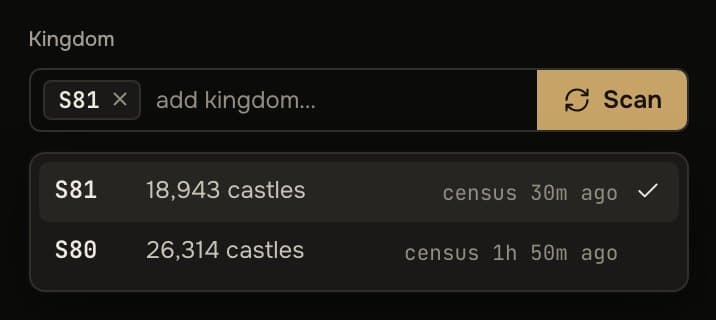
Kingdom picker with S81 selected and S80 below it.
I.

Pick a kingdom

Type its number: 81, #81 or S81 all work. Then press Quick Scan, or Deep Scan for the details.

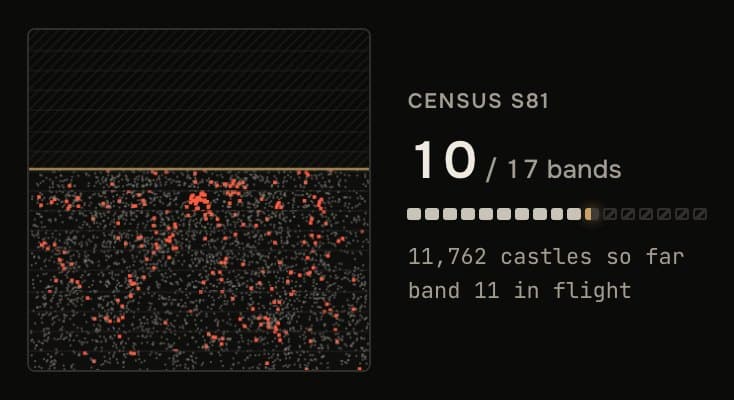
A scan in progress, 60% done.
II.

Results appear as the scan runs

A progress bar shows how far the scan is. Castles appear in the table and on the map while it runs.

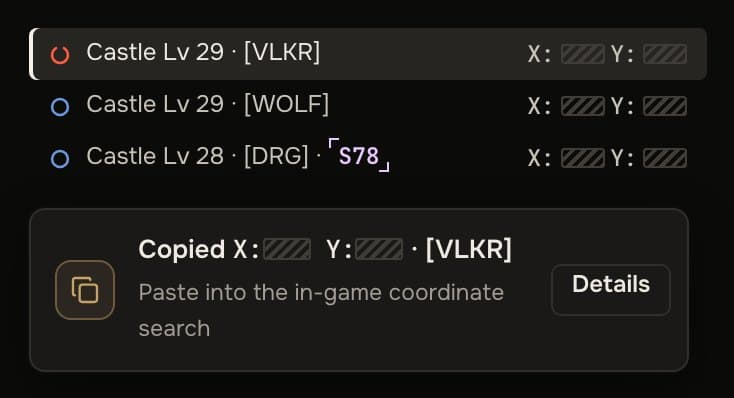
Three castle rows and a Copied coordinates toast.
III.

Copy coordinates and go

Click any row to copy its coordinates, then paste them into the game's coordinate search. Coordinates come with a plan.

What we read, what we don't

LordScanner reads the public world map and, for some Lords, the profile data the game returns.

We read

  • Castle positions, castle levels and shield state from the in-game world map of each kingdom you scan.
  • Lord names, alliance tags and home kingdoms, as the map shows them.
  • Power, kills and army power of each kingdom's higher-level Lords and of Lords out gathering, from the profile data the game returns, each with the time it was read.
  • The time each castle was read, so every row carries its age.
  • Where each castle sits and every move our scans have seen, kept long-term as its position history until you ask us to remove it.
  • Map objects such as resource tiles, Bounty Tasks and digs, with the Lords who own or occupy them, and each castle's wall condition.

We never

  • Ask for your game login or any game password.
  • Play, join alliances or act in the game for you. Location cards go only to your own connected account, and only when you press Send in-game.
  • Show castle rows or coordinates to visitors without a plan.
  • Read your private chats with other players. Messages you send to our game account, such as a reply to a code, may be read by us to run and troubleshoot in-game delivery, for support and for abuse checks.
Lords can opt out.Remove my castle

Three plans, one chart

Every plan opens castle rows, coordinates and the live map; they differ in how many new scans you can start per day, within shared safeguards. Monthly, cancel anytime. Prices in EUR, including VAT where applicable; Paddle handles checkout.

Envoy

Monthly · cancel anytime
  • New scansUp to 15 / day
  • KingdomsAny Top Lords kingdom
  • Castle rows and coordinatesIncluded
  • Live kingdom mapIncluded
  • New map objectsNot yet
Price€9.99/ month
Recommended

Marshal

Monthly · cancel anytime
  • New scansUp to 50 / day
  • KingdomsAny Top Lords kingdom
  • Castle rows and coordinatesIncluded
  • Live kingdom mapIncluded
  • New map objectsNot yet
Price€19.99/ month

Sovereign

Monthly · cancel anytime
  • New scansUp to 150 / day
  • KingdomsAny Top Lords kingdom
  • Castle rows and coordinatesIncluded
  • Live kingdom mapIncluded
  • New map objectsEarly access
Price€39.99/ month
Free account: the app and each kingdom's castle and invader counts. Castle rows, coordinates and scans come with a plan. Scan any Top Lords kingdom.Compare plans

Questions

Plain answers. The ones about accounts, payments and refunds carry the date they were last reviewed.

Does LordScanner touch my game account?

LordScanner never asks for your game login. You can optionally connect your game account in Account: we send a six-digit code to your private in-game chat to confirm it is yours. After that, Send in-game posts a location card to your own chat when you press it. We never play, join alliances or act in the game for you, and never read your private chats with other players. Messages you send to our game account, such as a reply to a code, may be read by us to run and troubleshoot in-game delivery, for support and for abuse checks.

Last reviewed October 10, 2026
Which kingdoms can I scan?

You can scan any Top Lords kingdom. Type its number on the Lords page (81, #81 or S81 all work) to open a kingdom. Your plan's limits count your scans across all kingdoms; each kingdom also has a shared daily limit, and for Deep Scans an hourly one (4 an hour, 24 a day).

How fresh is the data?

Every page says how old its data is, for example "Map 4 min ago · Details 22 min ago": the map (castles, shields, tiles) comes from the last Quick Scan, the details (Bounty Tasks, Digs, ruins, Trade Wagons and gathering squads) from the last Deep Scan. Times are always in UTC. A new scan reads the kingdom again, and results appear as the scan runs. If a scan of the same kind is already running, or has just finished (a Quick Scan within a few minutes, a Deep Scan within 15 minutes), you join or reuse it for free. LordScanner also reads kingdoms in the background (castles and shields): about once an hour for kingdoms people scan, and about once a day for every other kingdom, so a map can be newer than your own last scan, or up to about a day old until someone scans it. A Quick Scan puts its kingdom on the hourly reads. Those background reads never count against your plan.

How reliable is the shield state?

Shield end times come from a field in the map data whose exact meaning is not verified yet. Until it is, LordScanner marks those times as Unverified and only shows countdowns if explicitly enabled and labelled. Unshielded castles and the Capital Deadzone are shown as read.

How do I cancel or get a refund?

Cancel anytime from your Account; access continues until the end of your paid billing period. Every subscription comes with a 14-day money-back guarantee on its first payment (monthly renewals are not covered). Write to [email protected] or use paddle.net. Details are in the Refund Policy.

Last reviewed October 10, 2026
Does it work on my phone?

Yes. The Lords list and the kingdom map are built for phones too, with one-tap copy of coordinates. It runs in the browser; there is nothing to install.

Can I remove my own castle?

Yes. Email [email protected] with your Lord name and kingdom, as described on the opt-out page. We handle each request by hand, normally within 30 days: we delete your castle's stored records, including its position history and the raw replies LordScanner received from the game that contain it, and confirm by email. We also put it on our do-not-scan list, so LordScanner no longer records it, also after a rename; the raw game replies that include it are deleted automatically within 7 days.

Last reviewed October 10, 2026

Find your kingdom on the chart

Type its number. Sign in with your email, no password, and open the kingdom.

Scan any Top Lords kingdom. Castle rows, coordinates and scans come with a plan.